
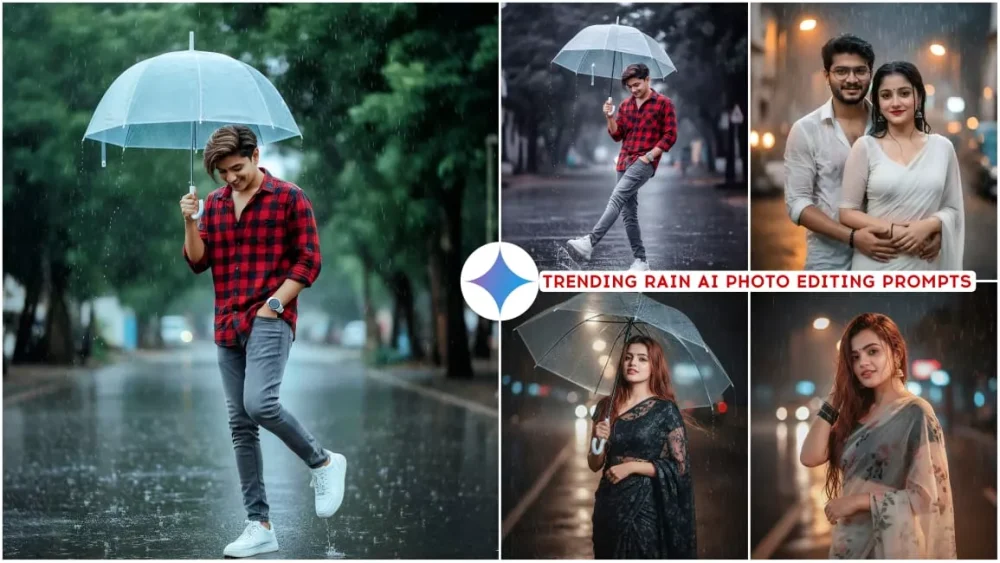
Rain photos always feel special. The water drops, cloudy sky, wet roads, and soft light create a deep emotional mood. Because of this, rain-style AI photos are trending everywhere. With Google Gemini, you can now create realistic rain photos that look like real camera shots.
The best part is that these Google Gemini Rain AI Photo Editing Prompts give 100% real face results. Faces stay natural, skin texture looks real, and the rain effect blends perfectly. In this article, we will explain why rain AI photos are trending, how Gemini creates realistic faces, and how you can use this style easily.
Why Rain-Style AI Photos Are Trending
Rain photography has a unique charm. It adds emotion, mystery, and depth to images. With AI, this style has become even more popular.
Here’s why rain AI photos are trending:
- Rain adds a cinematic and emotional feeling
- Photos look dramatic but natural
- Perfect for mood posts and profile pictures
- Works well with dark and soft lighting
- Looks professional without editing skills
Google Gemini understands rain effects very well, which makes the final image look realistic instead of artificial.
Google Gemini Rain AI Photo Editing Prompts

Create a Full-length portrait of a young woman like a Bollywood main character standing on a rainy roadside. She has long, soft, wavy brownish-red hair, partially wet and flying mildly in the rain, with visible rain droplets on her hair and glowing skin. She is wearing a light colored floral net saree with an aesthetic, dreamy vibe, along with a tiny bindi. The background shows blurred dark city lights in the rain, creating a cinematic and dramatic atmosphere, with soft light highlighting her. Her facial expression and face remain exactly the same as the reference picture, with no changes at all only the pose is happy, mysterious and artistic giving a dreamy vibe. The image has sharp professional portrait photography quality, with detailed features, cinematic rain, and a slight retro-vintage touch.
Use reference face of uploaded image & generate new image in which " An Indian man standing on a wet street during light rain, holding a transparent umbrella with his right hand. He is wearing a red vith black checked shirt with sleeves rolled up, grey slim-fit jeans, and white chunky sneakers. His head is slightly tilted down, smiling subtly. His left hand is in his pocket with white watch, and his right leg best pose forward in a playful kicking pose. The street is shiny from the rain, with a blurred background of green trees."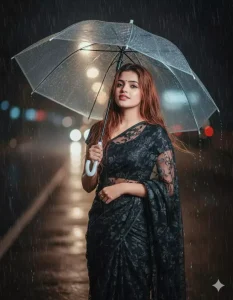
Create a Full-length portrait of a young woman like a Bollywood main character standing on a rainy roadside. She has long, soft, wavy brownish-red hair, partially wet and flying mildly in the rain, with visible rain droplets on her hair and glowing skin. She is wearing a black colored floral net saree with an aesthetic, dreamy vibe, along with a tiny bindi. She's holding an open transperant big umbrella. The background shows blurred dark city lights in the rain, creating a cinematic and dramatic atmosphere, with soft light highlighting her. Her facial expression and face remain exactly the same as the reference picture, with no changes at all only the pose is happy, mysterious and artistic giving a dreamy vibe. The image has sharp professional portrait photography quality, with detailed features, cinematic rain, and a slight retro-vintage touch.
A young man is standing in the rain in a natural environment, with a face that exactly matches the uploaded reference image. He is wearing a white sleeveless vest and has a light-colored jacket tied around his waist. He is wearing black sunglasses and holding a large green leaf above his head as a makeshift umbrella, with raindrops visibly falling from it. The raindrops should be clearly visible in the image. In the background, there are green trees and foliage, with a soft, misty atmosphere created by the rain. The overall mood of the image should be fresh and lively.
Take this photo of me in a saree and transform it into a cinematic rainy night street scene keep my exact face skin tone and expression unchanged do not alter or smooth my features keep my outfit jewellery exactly as in the photo make outfit and jewellery exactly as in the photo make my hair look wet and sleek add waram raindrops falling
Upload two photos of the couple and generate a full-size hyper-realistic cinematic portrait of them standing together in the rain. – Keep the faces exactly the same as the uploaded photos for originality. – The girl is wearing a beautiful saree, fully drenched, with natural wet-look details and raindrops on her skin and fabric. She is looking forward with a soft, romantic expression. – The boy, wearing a soaked white open shirt, is standing slightly behind her, gently holding her by the waist, creating an intimate and protective pose. – Both are smiling and enjoying the rain moment with love and warmth. – The atmosphere should be cinematic: visible raindrops, water glistening on clothes and skin, soft blurred background with glowing streetlights or a dreamy backdrop. – Make the overall scene intimate, romantic, vibrant, and full of emotions like a Bollywood rain sequence.
How Gemini Creates 100% Real Face in Rain Photos
Google Gemini uses smart AI systems that understand human faces and weather effects together.
It carefully manages:
- Water drops without covering the face
- Natural glow on wet skin
- Real eye reflections
- Hair wetness without distortion
- Background blur for depth
Because of this balance, the face stays clean and real while the rain effect adds drama around it.
Best Uses of Rain AI Photo Editing
Rain-style AI photos are perfect for many uses:
- Profile pictures with mood
- Story and post visuals
- Cinematic thumbnails
- Artistic portraits
- Attitude and emotional edits
Rain photos usually get more attention because they look deep and meaningful.
Tips to Get the Best Rain AI Photo Results
If you want high-quality output, keep these simple tips in mind:
- Use words like soft rain or cinematic rain
- Mention natural lighting
- Avoid too many effects
- Keep facial expression calm or serious
- Choose a simple background
Simple and clean prompts always give better results.
Why Google Gemini Is Best for Rain AI Editing
Google Gemini stands out because:
- Faces remain realistic
- Rain blends naturally with lighting
- No cartoon or plastic look
- Fast image generation
- High-resolution output
That’s why Gemini rain AI photos look closer to real photography than most AI tools.
Common Mistakes to Avoid
Avoid these mistakes for better images:
- Adding too many styles in one prompt
- Using heavy glow or filters
- Ignoring face details
- Making rain too strong
Keeping balance is the key to realistic rain AI photos.
Conclusion
Google Gemini Trending Rain AI Photo Editing Prompts With 100% Real Face are perfect for creating emotional, cinematic, and realistic images. The rain effect adds mood, while Gemini keeps the face natural and clean.
If you want professional-looking rain photos without editing apps or skills, Gemini AI is the best choice. Just use the right prompt and let AI do the magic.
FAQs
Q1. Do rain AI photos look real in Google Gemini?
Yes, Gemini creates natural faces with realistic rain effects.
Q2. Can beginners use Rain AI photo editing prompts?
Yes, no experience is needed at all.
Q3. Can I control how strong the rain looks?
Yes, you can adjust rain intensity inside the prompt.

Expert tech creator and best photo and video editor since 2018.